Make-and-C
Firstly, you have to create a sample source code in C language to be compiled using Make Automation Tool.
main.c :
#include "type1.h"
#include "type2.h"
#include <stdio.h>

int main() {
    int a = type1_add(1, 2);
    int b = type2_multiply(3, 4);
    printf("a = %d\n", a);
    printf("b = %d\n", b);
    return 0;
}
type1.c :
#include "type1.h"

int type1_add(int x, int y) {
    return x + y;
}
type2.c :
#include "type2.h"

int type2_multiply(int x, int y) {
    return x * y;
}
type1.h :
#ifndef TYPE1_H_INCLUDED
#define TYPE1_H_INCLUDED

int type1_add(int x, int y);

#endif // TYPE1_H_INCLUDED
type2.h :
#ifndef TYPE2_H_INCLUDED
#define TYPE2_H_INCLUDED

int type2_multiply(int x, int y);

#endif // TYPE2_H_INCLUDED
In this example, main.c includes the header files type1.h and type2.h, which declare the functions type1_add and type2_multiply, respectively. These header files are included at the top of main.c to ensure that the function prototypes are available to the main function.
The type1.c and type2.c files implement the functions declared in type1.h and type2.h, respectively. These source files include their respective header files to ensure that the function prototypes match with the actual function definitions.
To compile the above program with make, you’ll need to create a Makefile in the same directory as your source code. Here’s an example Makefile that corresponds to the above example:
Makefile :
CC=gcc
CFLAGS=-Wall

SRC=main.c type1.c type2.c
OBJ=$(SRC:.c=.o)

all: program

program: $(OBJ)
	$(CC) $(CFLAGS) -o $@ $^

%.o: %.c
	$(CC) $(CFLAGS) -c -o $@ $<

clean:
	rm -f program $(OBJ)
Let’s go through each section of this Makefile:
CC specifies the compiler to use (in this case, gcc).
CFLAGS specifies any flags you want to pass to the compiler (in this case, -Wall enables all warnings).
SRC lists all the source files for your program (main.c, type1.c, and type2.c).
OBJ specifies the corresponding object files for each source file (e.g., main.o, type1.o, and type2.o).
all is a special target that tells make what to build by default when you run make. In this case, it’s program.
program is the final executable that we want to build. It depends on all the object files ($(OBJ)), and is built by linking them together using the compiler.
%.o: %.c is a pattern rule that tells make how to build any object file (%.o) from its corresponding source file (%.c). It compiles the source file into an object file using the compiler.
clean is a target that removes the program executable and all object files.
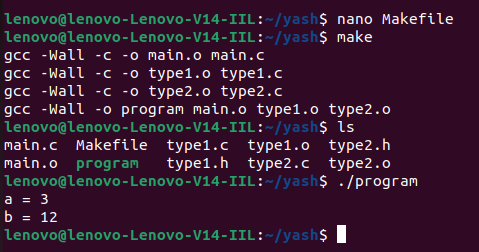
To compile the program, you can simply run make in the same directory as your Makefile and source code. This will build the program executable using the rules specified in the Makefile.
To clean up the build artifacts (i.e., the program executable and object files), you can run make clean.
My Output:
What are dependencies in above example?
In the above example, there are several dependencies that need to be resolved in order to build the final executable program. These dependencies are specified in the Makefile using the all and program targets, as well as the pattern rule for building object files.
The all target depends on the program target, which means that in order to build all, program must be built first. This is because all is defined as follows:
all: program
The program target depends on all the object files ($(OBJ)), which are built from the corresponding source files ($(SRC:.c=.o)). This is specified by the following line in the Makefile:
program: $(OBJ)
In addition, the object files themselves depend on their corresponding source files. This is specified by the following pattern rule:
%.o: %.c
This rule tells make how to build any object file (%.o) from its corresponding source file (%.c). When make encounters a dependency like this, it automatically tries to build the target by running the rule associated with the target.
By specifying these dependencies, make can determine the correct order in which to build the various components of the program. It ensures that each component is built only once and in the correct order, minimizing build times and avoiding unnecessary work.